
The booking feature is ready. Now the developer needs confirmation emails, deposit payments, and customer photo uploads. Each service brings provider setup, credentials, SDK or request contract, testing, and maintenance. When a second application needs the same services, much of that integration work starts over.
Gateman standardizes how the application connects to external services without making developers rewrite native provider requests into an invented cross-provider schema. The application reuses one official client and authentication pattern; Gateman handles provider credentials and connection plumbing. SES keeps its documented message fields, Stripe keeps its native method, path, and body, and S3 keeps its native upload model.
Every provider adds another integration project
Each provider brings its own credentials to handle, authentication plumbing, environment setup, transport or request path, and ongoing maintenance. The developer connects email to SES, configures Stripe credentials and payment requests, then builds S3 upload signing. They also maintain safe email testing and separate test and live payment settings. Initial setup is only the start: every new provider adds another integration to update, test, and keep working as the application and its dependencies change.
Gateman centralizes the provider side of its supported operations. The developer creates or selects a Gateman application, enables the email, Stripe, and S3 capabilities it needs, and configures those providers for the app. The application authenticates to Gateman with an official client; the underlying provider credentials stay configured at Gateman.
Give your coding agent a repeatable approach
Rather than ask an agent to research three authentication models and invent a different integration structure for each provider, give it Gateman's app-specific bootstrap instructions and the feature requirements. The console-generated prompt explains how to connect the application. After authenticating with the official client, the agent can request /client/get for the app's current authorized capabilities and follow each linked reference.
For example, the developer could ask Codex or Claude Code:
Add transactional email, Stripe deposits and S3 uploads to this booking application using Gateman. Follow the supplied Gateman bootstrap instructions and the enabled capability references.
The agent implements each operation from its documented contract instead of rediscovering provider authentication and Gateman conventions. The developer keeps the app's signing material in its server-side runtime configuration; provider credentials stay in Gateman. The agent works with the capabilities enabled for that app, not unrestricted provider administration.
Add email, payments and uploads to the booking flow
Send appointment confirmations
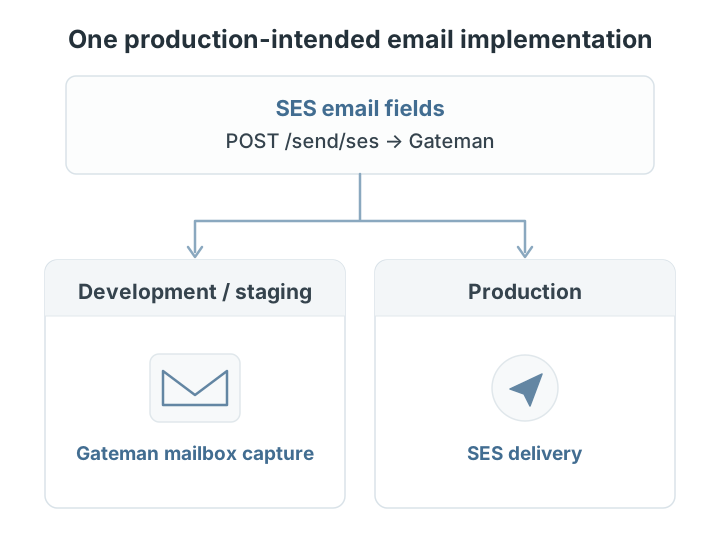
The developer writes production-intended email code once, using the same documented SES message fields and Gateman endpoint, POST /send/ses, in development, staging, and production. Gateman handles the transport based on the application's declared environment: nonproduction messages are captured in its local mailbox, and production messages go through the app's configured email provider.
That means no separate mock transport, no environment-specific email implementation, and less code to maintain. The developer can test the real booking flow and inspect captured messages, while the application decides when to send, who receives the email, and what it says.
Collect Stripe deposits
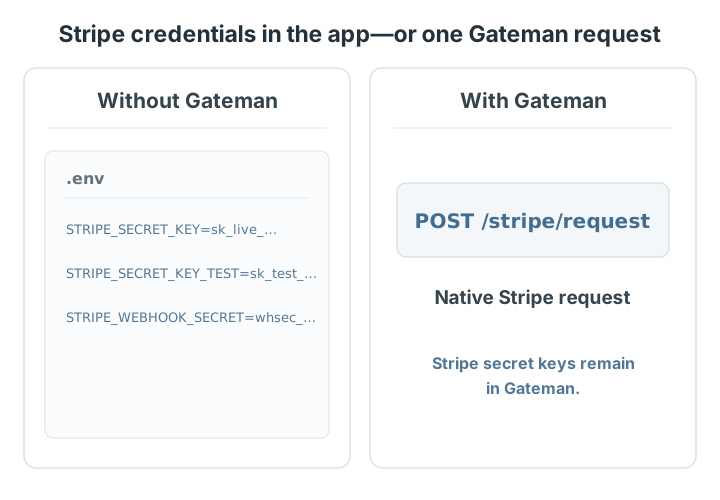
The app sends authenticated requests to POST /stripe/request through Gateman's Stripe capability. The request carries Stripe's native method, path, and body. Gateman selects the credential configured for the app's declared environment and relays the request without returning the secret key to the application.
That removes Stripe credential loading and provider authentication from the app's integration plumbing. The app still owns the checkout experience, booking rules, and interpretation of Stripe's payment status. Development and staging use the configured Stripe test credential and still call Stripe's test API.
Accept customer image uploads
For profile photos, the app asks Gateman's S3 capability to create a presigned upload request. The browser sends the image bytes directly to S3 using the returned URL and headers; Gateman signs the S3 operation but does not carry the file. The app can accept uploads without implementing credential-based AWS request signing or exposing its S3 credentials to application code.
Together, these integrations give the booking app a familiar authenticated connection to each service, while the provider's own request fields and behavior stay clear. Gateman handles the provider connection; the application combines email, payment, and upload results into the booking experience.
Provision SES infrastructure in minutes
SES can require work across AWS IAM, SES, DNS, and SNS before the app can send and track email. With Gateman Premium, prepare the temporary AWS setup access and a restricted Cloudflare token, enter the AWS region and sending domain in Gateman, and start provisioning.
Gateman automatically configures the scoped, permission-bounded control identity and a separate least-privileged runtime identity, verifies the SES domain and DKIM, publishes Cloudflare DNS records, and connects the SES configuration set and SNS events to Gateman's tracking and suppression. The result is a provisioned SES integration ready for the application's email capability.
Provision SES in as little as three minutes, replacing approximately 20–30 minutes of comparable manual AWS and DNS setup. AWS production-sending approval, if needed, is a separate process and remains AWS's decision. See the SES provisioning guide for the complete workflow.
Reuse the integration pattern as your applications grow
For a small agency, the first booking app establishes how to connect email, payments, and storage with Gateman. The next client project can reuse the official language client, authentication conventions, capability references, and agent bootstrap instructions rather than rebuilding each provider connection. Email keeps its documented environment behavior; Stripe and S3 keep their own native request contracts.
Each Gateman application has its own identity, permissions, and provider configuration. The team reuses its integration approach without sharing application access or repeating the same research and credential plumbing. As the portfolio grows, developers and agents can spend more time on each product's requirements and less time reconstructing provider integrations.
Gateman also fits applications that already have direct provider integrations. A coding agent can refactor a supported operation incrementally while the rest of the application stays in place, so the team can adopt the pattern without rebuilding its product.
Stop rebuilding integration plumbing
Start with the booking feature that needs transactional email. Configure the Gateman app and its email capability, then give your coding agent the bootstrap instructions and ask it to implement appointment confirmations with an official client. Test in staging, where Gateman captures the email, then extend the same approach to Stripe deposits and S3 uploads. Each new service follows its own capability contract without making you rebuild the integration foundation.