
An AI coding agent can build the feature you describe. The slower part is often the integration around it: finding provider documentation, choosing an authentication method, wiring credentials into local and deployed environments, and building a safe way to test. Then the next service or application repeats much of that work.
With Gateman, configure the provider and the capabilities an application may use, then give your coding agent the app-specific bootstrap instructions and a feature request. The agent follows the official client and authenticated capability references. For supported operations, the application calls Gateman and Gateman uses the configured provider credential. You do not need to paste an AWS or Stripe key into the agent conversation just so it can implement the integration.
That gives the agent a known path to follow and gives the development team less provider-specific authentication and credential plumbing to write, test, and maintain.
Give the agent a task and a working integration path
Suppose you are adding receipt email to an existing application. With a direct SES integration, the agent may need to research AWS authentication, configure the SES SDK and credential loading, account for development and production sending, and arrange safe nonproduction testing. The team then maintains that provider setup alongside the receipt feature.
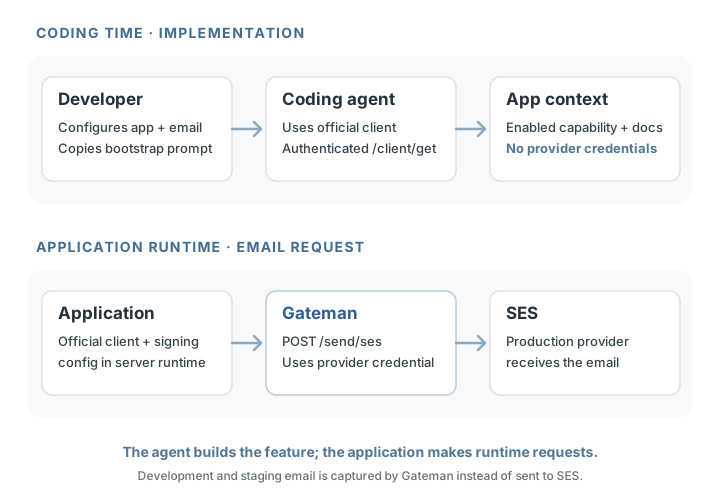
With Gateman, configure the application's email provider and enable email.send in the console. Copy the application's generated AI-agent bootstrap instructions, give them to the agent with the receipt-email request, and let it follow the documented path. For example:
We're using Gateman for external-service integrations in this application. Follow the supplied Gateman bootstrap instructions and implement transactional email using the enabled email capability. Preserve the existing application logic and use the documented environment behaviour for testing.
The bootstrap instructions establish the app-specific Gateman connection and point the agent to an official client. They do not expose the configured provider credentials. Your application still authenticates to Gateman; its signing material belongs in protected server-side runtime configuration and is not automatically supplied to the agent.
POST /client/get requires Contract v1 authentication and the client:read scope; the bootstrap prompt itself is not an authorization token. The authenticated response supplies the application's current authorized capabilities and implementation references. The agent follows the email reference and uses the official client to implement the requested feature. The developer tests the existing receipt flow in the application and decides when to deploy it.
Gateman's official clients are available for PHP, Node.js, Python, and Go directly from Gateman. The agent can use the one for the existing application's language instead of reconstructing Gateman's request signing and transport. It can concentrate on adding receipt email; it does not need the underlying SES credential to implement the supported operation.
Follow the documented request contract
Gateman standardizes application authentication and the connection pattern while keeping each capability's documented service semantics. That gives a coding agent a stable integration approach without asking it to learn one universal schema for every provider.
For SES, POST /send/ses accepts Gateman's documented email message fields, including to, subject, text, and html. This is the email capability's request shape, not a raw AWS SES SDK request; Gateman validates it and applies the configured sender identity and provider authentication. Supported Stripe operations retain Stripe's native method, path, and body through POST /stripe/request, while S3 presigning retains the direct object-transfer model. The agent follows the selected capability reference for its supported operations and rules.
Here is the JSON body for an SES email request:
POST /send/ses
Content-Type: application/json

{
  "environment": "staging",
  "to": ["customer@example.com"],
  "subject": "Your receipt is ready",
  "text": "Thank you for your order.",
  "html": "<p>Thank you for your order.</p>"
}
environment is a JSON body field. The official clients inject it from the application's configured environment for this route, so the application code can use the same message payload across environments. The client also supplies Contract v1 authentication; the provider key is not in the request. At least one of text or html is required, and the sender identity is configured in Gateman. The email reference documents response and failure handling.
Write production-intended email code once
The developer tests the existing receipt flow in staging. The official client adds environment: staging to the request body, and Gateman captures the generated email in its local mailbox without contacting SES. In production, the same production-intended email implementation sends through the provider configured for the Gateman application.
That gives the existing application one email implementation, with no separate mock sending transport to build or maintain. The agent spends less effort on AWS authentication and environment-specific plumbing, while the developer still tests the receipt behavior and reviews the result before deployment.
Bring the same pattern to other services
Once an agent has the app-specific bootstrap and client, a later task can use the same integration foundation for another enabled capability. The application keeps its Gateman authentication pattern while each service keeps its own request contract. That reduces repeated research into provider authentication and setup across supported operations, and makes the approach reusable across applications and languages.
It also works when an application already calls a provider directly. Configure the corresponding Gateman capability, then ask the agent to inspect the existing integration and replace that supported provider operation while preserving the surrounding application behavior. The agent can make the change incrementally; the rest of the application does not need a rewrite. Begin with one operation and use its capability reference to define the boundary.
Common questions
Does the coding agent need a provider key?
For a supported mediated operation such as email sending, no. Gateman uses the configured provider credential. The application authenticates to Gateman with its own signing configuration, which belongs in protected server-side runtime configuration.
Does the bootstrap prompt contain every enabled capability?
No. It establishes the connection and instructs the client to call authenticated POST /client/get. That response is the current, application-scoped capability context and links to the relevant references.
Can I use my existing application's language?
Yes. Gateman distributes official clients for PHP, Node.js, Python, and Go. The agent uses the client appropriate to the codebase and the capability's documented request contract.
Start with one feature
Configure a Gateman application and its email capability, copy the app's bootstrap instructions, and ask your coding agent to add transactional email to the existing feature flow. The agent can follow a supported path without being handed SES credentials, while your team avoids rebuilding provider authentication and nonproduction transport logic.
Read Using Gateman with coding agents, Bootstrap context, and the email capability reference. For the application connection, see Contract v1, environments, and the official PHP, Node.js, Python, and Go client guides.