
A coding agent can configure an integration more reliably when it starts with the facts about your application: which Gateman capabilities are enabled, which routes they expose, and where their current implementation contracts live. Without that context, each task can turn into another round of prompt-writing and documentation research.
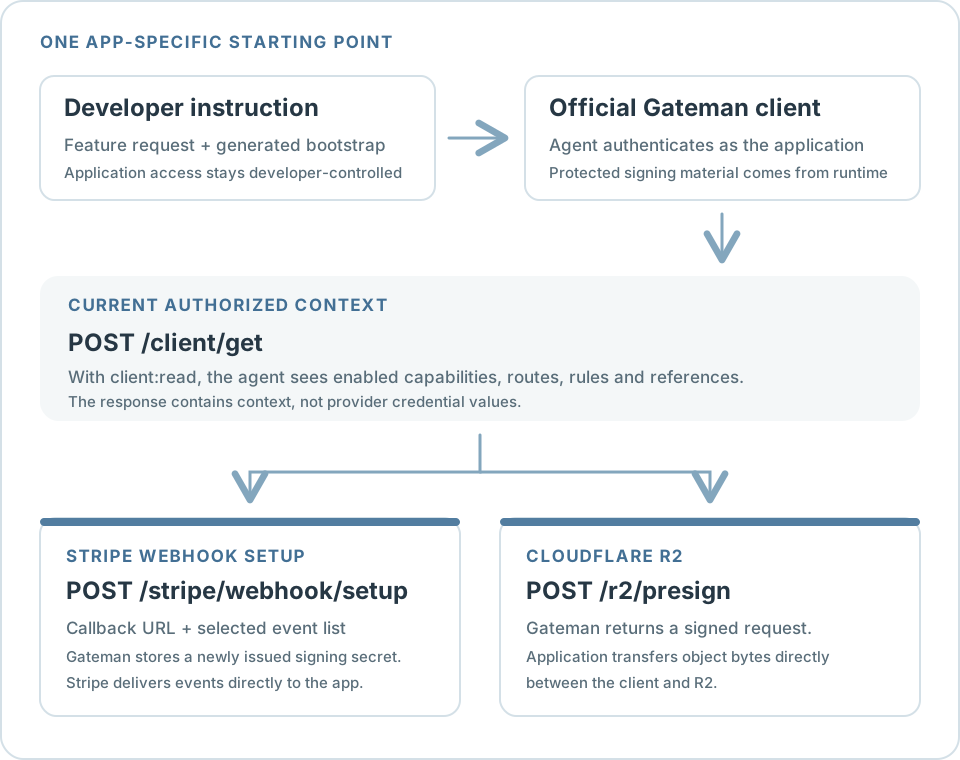
Gateman gives the agent an application-specific starting point. The developer copies the generated bootstrap instructions, configures protected Gateman authentication in the application runtime, and asks the agent to implement a feature. The agent uses an official client and POST /client/get to discover the application's current authorized capability context, then follows the relevant capability reference. The same handoff can guide very different work, from configuring Stripe webhook events to adding an R2 upload flow.
Start from the application's current capabilities
In the Gateman console, copy the application's generated AI-agent bootstrap and .gateman configuration template. The bootstrap explains how to connect using an official PHP, Node.js, Python, or Go client and retrieve the current context. The template identifies the application, Gateman base URL, and authentication mode, with a placeholder for its signing credential. The developer or deployment process supplies that credential to the server-side runtime; it should not be pasted into reusable agent instructions or browser code.
After authenticating, the agent calls POST /client/get, which requires the application's client:read scope. The response includes only capabilities available to that authenticated application, their routes, relevant safe configuration metadata, environment behavior, implementation rules, and links to their current references. It does not contain provider credential values. Bootstrap instructions establish the connection; they do not grant capability access. The application must already have the required scope, and a new /client/get request reflects later authorization changes.
Official clients provide authenticated request transport, not provider-specific shortcuts or automatic capability knowledge. They also do not automatically load .gateman or .env: the application or deployment must load configuration into the runtime using the language-specific client setup. This lets an agent work from a repeatable connection pattern while keeping the application's authorization and signing material under developer control.
Configure Stripe webhook events through Gateman
Selecting a long event list in a provider dashboard is tedious, especially when the application changes and the endpoint needs a different callback or subscriptions. With Gateman, the developer can give the coding agent the callback URL and the events the application needs. The agent checks the app's current context, reads stripe.webhook.write, and implements webhook setup using the application's authenticated Gateman client. Setup runs when the endpoint or its event subscriptions need configuring, rather than during normal payment processing. The agent does not need the Stripe API key.
The setup route accepts an environment, HTTPS callback URL, and event list. For example:
{
  "environment": "production",
  "callback_url": "https://example.com/webhooks/stripe",
  "events": [
    "checkout.session.completed",
    "payment_intent.succeeded",
    "payment_intent.payment_failed"
  ]
}
These are illustrative event choices; select the events your application actually handles. Stripe documents webhook event types and the webhook endpoint API.
With the application's stripe:webhook:write scope, POST /stripe/webhook/setup creates or reconciles Gateman's supported webhook endpoint using the configured Stripe credential. The setup response reports the endpoint configuration but omits the signing secret. When a new endpoint is created, Gateman stores the secret Stripe returns in the matching test or live credential slot. The application can retrieve that value separately through the stripe.webhook.read capability when granted its independent stripe:webhook:read scope.
Write does not imply Read or stripe:use. Gateman tracks one live and one test endpoint association per application; staging and development both use the same test association. A later setup request can update its callback URL or event subscriptions without replacing the stored signing secret. If the tracked Stripe endpoint no longer exists and Gateman creates a replacement, Stripe issues a new secret and Gateman replaces the corresponding stored value.
Stripe delivers subsequent events directly to the application's callback. The application remains responsible for verifying each webhook signature and processing the event. Gateman handles endpoint setup and storage of the newly issued secret; it is not in the delivery path.
Use the same handoff for Cloudflare R2 uploads
The bootstrap can also orient an agent to a different kind of integration. For an upload feature, the agent checks whether /client/get includes the application's r2:use capability, reads its reference, and builds an authenticated POST /r2/presign request. The request selects put or get, a bucket and object key, a Cloudflare jurisdiction, an expiry from 1 to 3,600 seconds, and optional native operation parameters. For a PUT upload, parameters.ContentType can specify the content type.
Gateman returns a presigned URL, method, and required headers. The application then transfers the file directly to Cloudflare R2 using that returned request. Gateman signs the operation but does not carry the object bytes. This is a different provider contract from Stripe webhook setup, reached through the same app-specific bootstrap and current capability context.
Give the agent the task, not another hand-built briefing
The developer configures the Gateman application and provider, enables the scopes the feature needs, and copies the generated bootstrap. The agent retrieves current context, opens the linked capability reference, and implements the requested application behavior against that contract. The application makes authenticated Gateman requests with signing material loaded in its protected runtime; provider credentials for these supported operations remain configured in Gateman.
That saves developers from repeatedly explaining the same application setup or asking an agent to infer which operations are available. It also gives the agent a useful boundary: build against capabilities this application is authorized to use, while letting each provider retain its own request and delivery semantics.
Open the Gateman application, copy its generated bootstrap, and give your agent the feature to implement. It can retrieve current context, follow the appropriate capability reference, and build against the application's existing Gateman configuration.