
Setting up Amazon SES for an application can mean coordinating IAM, SES, DNS, and SNS before anyone writes the first email feature. Gateman Premium automates that supported infrastructure workflow. With the required AWS and Cloudflare access, an AWS Region, and a sending domain ready, provisioning can take as little as three minutes. A comparable manual setup can take 20–30 minutes of creating identities, policies, DNS records, event resources, and runtime credentials.
The result is more than an SES account configured for sending. Gateman establishes a bounded control identity, a separate application sending identity, domain authentication, and the event path used for email tracking. The resources remain in your AWS account, while the application integrates through Gateman's email.send capability.
The work behind a manual SES setup
Doing this by hand means creating and scoping IAM policies, verifying a sending domain in the right Region, publishing DKIM and DMARC records, and ensuring SES can use the records. You then configure a configuration set, connect it to an SNS topic and subscription, and wire send, delivery, bounce, complaint, and rejection events into an operational path. Finally, the application needs credentials that can send without also receiving unnecessary account privileges.
Each step has its own AWS or DNS context. A mistake in one can leave a domain unverified, events unobserved, or an application holding credentials that are too powerful. Teams often keep a runbook for this sequence and repeat it for every new application.
With Gateman, you provide the setup access once and start the full provisioning workflow. Gateman performs the supported AWS and DNS configuration in dependency order, saves progress, and gives you a place to continue when an external confirmation is pending. Your developers can focus on the product's email behavior instead of rebuilding the provider setup.
Start provisioning with five inputs
In the application's SES section, choose Full SES provisioning. The current setup form asks for an AWS Region, a sending domain, the access key ID and secret access key for a temporary IAM user named Gateman-Setup, and a Cloudflare API token. The console supplies the one-time Gateman-Bootstrap policy for that setup user. The Cloudflare custom token is restricted to the selected zone with Zone Read and DNS Write permissions.
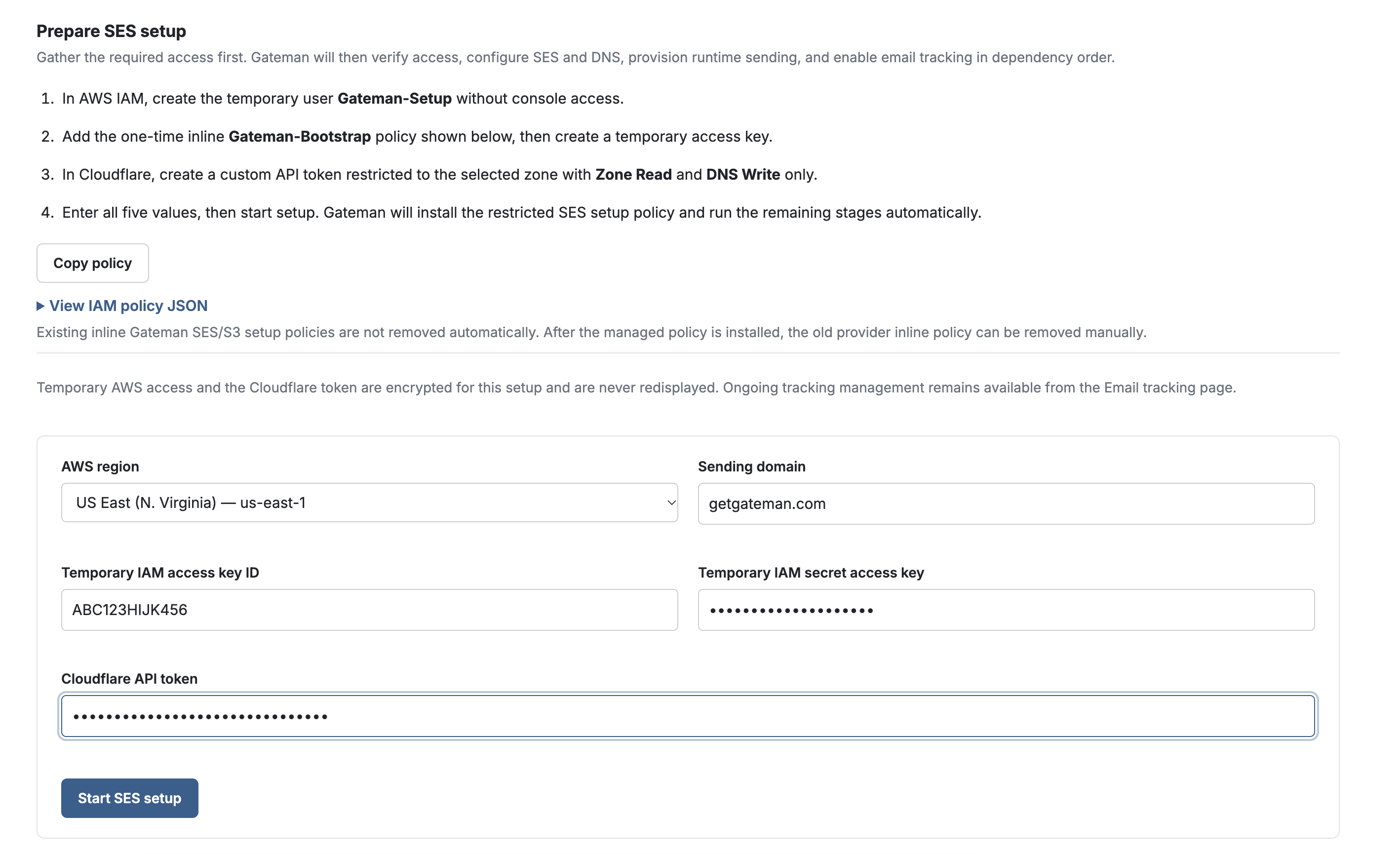
Once you start, Gateman automatically configures the supported AWS and Cloudflare resources: a permission-bounded control identity, the SES domain identity and DKIM, the required DNS records, and the configuration set and SNS event path for email tracking. It also creates a separate, permission-bounded runtime identity for the application, with sending limited to the configured domain and Region. These resources stay in the AWS account and Cloudflare zone you authorized.
After the persistent control identity is verified, Gateman revokes the temporary AWS setup key and deletes its encrypted copy. The application uses the runtime sending path through Gateman; it does not receive either AWS identity's credentials.
The finished setup connects sending and tracking
From a short setup form to configured SES infrastructure: Gateman establishes domain authentication, DNS, runtime sending permissions, and email-event tracking. Gateman uses SES send, delivery, bounce, complaint, and reject events to maintain email status and suppression handling, so your application does not need its own SES-to-SNS tracking implementation. Your application still owns recipient consent, unsubscribe preferences, and decisions about when a message should be sent.
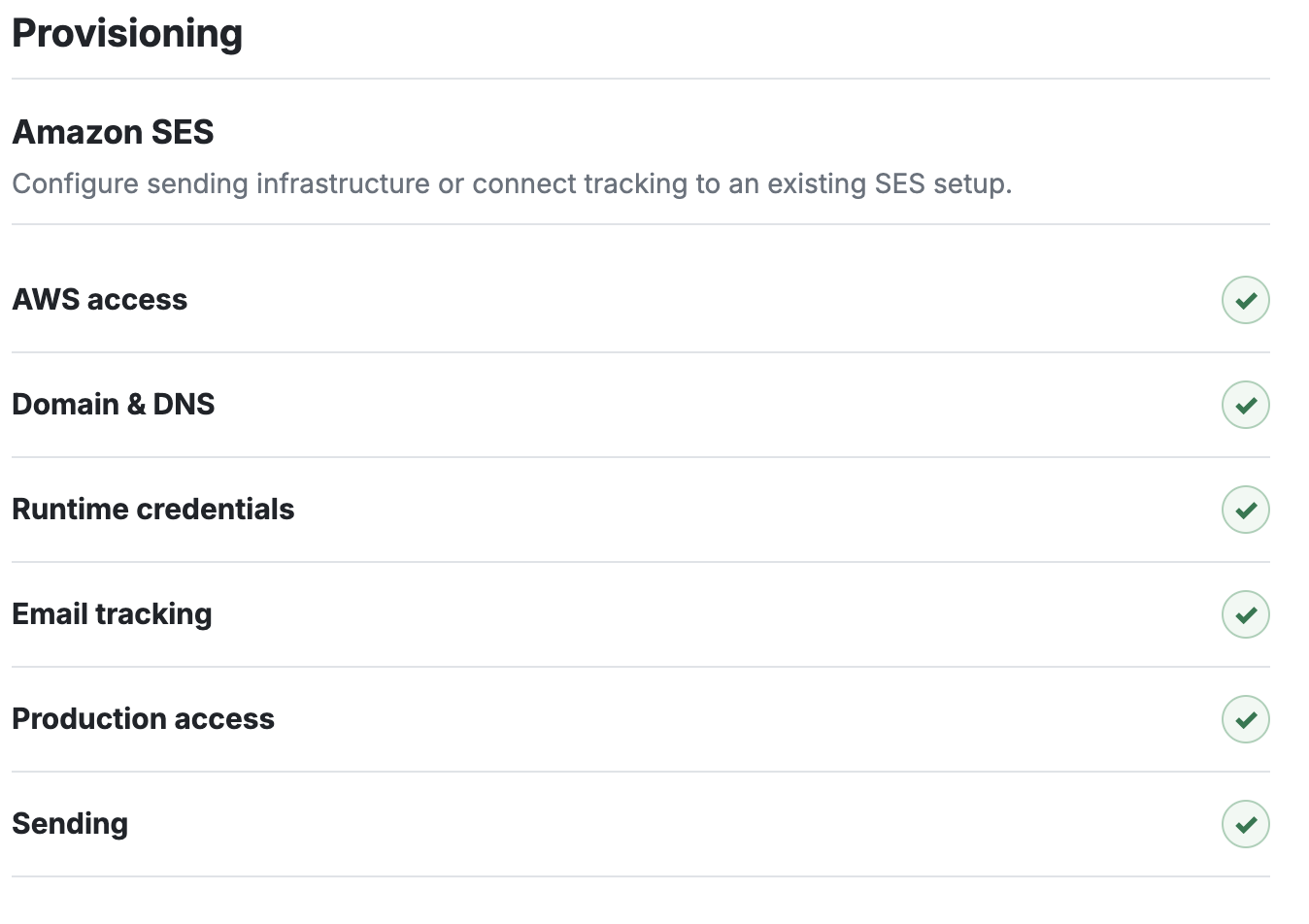
Gateman records completed phases and can resume after recoverable failures or external waits without unnecessarily repeating completed operations. It verifies and reuses supported existing resources, and stops when it cannot establish that a conflicting resource is safe to adopt or change.
Send through Gateman from your application
After provisioning, your application sends SES mail through Gateman's documented email.send capability at POST /send/ses. The app authenticates to Gateman with its application credential and uses the documented SES message contract. It does not need the AWS access key or AWS request-signing code. Official Gateman clients for PHP, Node.js, Python, and Go, along with application-specific coding-agent bootstrap instructions, give developers and coding agents the integration context without exposing the underlying SES credential.
Write production-intended email code once. In development and staging, Gateman captures supported messages in its local mailbox without calling SES. In production, the same capability sends through the configured provider. You can exercise the application's real email path before launch without maintaining a separate mock transport or changing the send implementation for production.
The SES sandbox has its own readiness process. For a sandbox account using full provisioning, the console supports verifying a recipient you control, sending a test message, and running SES mailbox-simulator cases for success, bounce, and complaint. Gateman checks the resulting events before presenting the production-access request. It submits the structured request to AWS using the persistent Gateman-SES-Control identity; AWS makes the approval decision and may ask you for follow-up information. If the account already has production access in that Region, the sandbox checks and request are skipped. Provisioning the infrastructure and receiving AWS approval are separate steps.
Choose the setup that fits your SES account
Full provisioning is for teams that want Gateman to establish the supported sending and tracking infrastructure. If SES already sends for your application and you only want Gateman to receive events, Email tracking only connects tracking without creating a new domain identity or runtime sending identity. If you already manage sending and do not need Gateman-managed tracking, keep your existing SES configuration and use the standard email.send capability. Managed provisioning and tracking are Premium console features; ordinary SES sending through email.send does not require you to rebuild an existing setup.
Automate the setup your next application needs
Start with the sending domain and provider setup your team would otherwise configure by hand. In Gateman, choose Full SES provisioning, provide the restricted setup access, and let the workflow establish the supported SES, DNS, IAM, and tracking components in your AWS account. Then give your application or coding agent Gateman's bootstrap instructions and implement email against the documented capability.
Read the Amazon SES provisioning guide for prerequisites, policies, and workflow details, and the email sending guide for the request contract and environment behavior. For AWS's sandbox and production-access process, see Request production access.