
A secrets manager protects your credentials. But who does the work of integrating the services behind them? Developers still implement provider SDKs, configure authentication and environments, build safe test workflows, and maintain each integration—then repeat much of that work for the next application.
1Password helps manage and securely deliver credentials. Gateman takes a different approach: applications call ready-to-use capability endpoints while Gateman handles the provider integration. Teams can reuse that pattern across projects, use one email path through development, staging, and production, give coding agents a known implementation workflow, and automate infrastructure such as SES. Gateman can complement the credential manager a team already uses.
The difference is the work your application still has to do
With 1Password, developers can manage who has access to a credential and arrange for an authorized process to resolve or inject it. 1Password documents CLI workflows such as op run, op read, and op inject, as well as service accounts for automation. The application can then call the provider directly. That is a useful and secure workflow when direct provider access is what the application needs.
Gateman changes the provider call itself for its available capabilities. Configure a provider for a Gateman application, enable the capability, and call its endpoint with an official Gateman client. Gateman authenticates the app, checks its authorization, and uses the provider credential. The app never needs that underlying provider key for the mediated operation.
| Developer work | 1Password with a direct provider integration | Gateman |
|---|---|---|
| Manage credentials | Store credentials centrally and make them available to authorized people or processes | Configure provider credentials for the Gateman application that uses the capability |
| Implement the provider call | Application code uses the provider's SDK or API and handles its request and response | Application calls the documented Gateman capability using an official client |
| Configure each application environment | Deliver the provider credential and maintain provider-specific configuration for each environment | Configure the app's Gateman connection; keep the underlying provider key at the Gateman boundary |
| Test email without sending externally | Set up a safe test transport or mock as part of the application workflow | Use the same email operation in development and staging; Gateman captures those messages |
| Repeat in another app | Reuse or adapt the direct provider integration and deployment setup | Reuse the Gateman client and capability pattern, with separate app identity, authorization, and provider configuration |
| Set up SES infrastructure | Create and connect resources across AWS and DNS | Gateman provisions the SES infrastructure and connects sending and event tracking |
1Password manages credentials. Gateman can remove the provider-specific integration work from the application. For many teams, the products solve different problems and work well together.
One email integration for development, staging, and production
Imagine a team adding appointment confirmations to a booking app. In a direct SES integration, the team implements a send call and configures AWS credentials for development and production. To test without emailing real customers, it may also create a mock sender or a separate transport and maintain application branches that select between them.
With Gateman, the application uses the same SES email operation, POST /send/ses, for the appointment confirmation in every environment. It sends the recipient, subject, and body through its Gateman client, which includes the application's declared environment. The developer writes the integration once; Gateman handles capture or delivery for that environment.
Gateman uses the declared environment to choose the email transport:
- In development and staging, Gateman validates and captures the message in its local mailbox without contacting SES.
- In production, Gateman sends through the SES provider configured for that Gateman application.
The same provider-native payload and application call work across environments. Developers can exercise the production-intended path in staging, inspect captured messages, and deploy the same integration to production. They do not need separate mock transports, SES keys, or provider-specific sending implementations just to support development and staging.
The application still decides when an appointment is confirmed, who receives the message, and what it says. Gateman routes the email according to the environment configured by the application.
Reuse the integration pattern across applications
Now imagine a small agency maintaining five customer applications. Each needs transactional email. Without a consistent provider operation, every project can accumulate its own SDK setup, sender configuration, environment variable names, test transport, deployment instructions, and provider-key rotation steps. The first integration is work; the next four repeat much of the same discovery and maintenance.
With Gateman, each app has its own Gateman application identity, capability authorization, and provider configuration. The code can still follow the same pattern in every project:
- Use the official Gateman client for the app's language: PHP, Node.js, Python, or Go.
- Authenticate with the app's Gateman signing configuration.
- Call the documented SES email route with the SES capability's request fields.
- Set the application's environment through its runtime configuration; the client includes it on the email request.
Each app keeps its own identity, permissions, and provider configuration, while developers and coding agents reuse the same Contract v1 model, official clients, authentication conventions, SES request fields, staging behavior, and bootstrap instructions. The fifth application should not require rebuilding the same provider integration for the fifth time.
Keep provider credentials out of each application's configuration
Credential sprawl is often visible in project configuration. One app might expect AWS_SES_KEY, another AWS_KEY, a third SES_KEY, and a fourth SES_PRODUCTION_KEY. These names are illustrative, but the underlying problem is common: every project and deployment needs conventions for placing the provider key, loading it, separating staging from production, and updating it safely.
When an app calls a provider operation through Gateman, it does not need the underlying provider credential. Gateman keeps the provider configuration for that app and uses it for the operation. That means fewer provider-key copies, provider-specific environment variables, and secret-loading routines to maintain across projects.
Each app still protects its own Gateman signing material and receives only its configured capabilities. The distinction is straightforward: applications authenticate to Gateman; Gateman holds the provider credentials used for its operations.
Give a coding agent a known integration path
Gateman gives a coding agent a repeatable way to build an external-service integration, not just another set of docs to search. Bootstrap instructions, official clients, and authorised capability references show the agent which client and contract to use. On the next project, the developer avoids repeating the research into a provider SDK, authentication pattern, credential setup, and safe test transport.
For the booking app, the developer enables email.send, configures SES for the Gateman app, and gives the coding agent its console-generated bootstrap prompt with a task such as:
Add transactional email to this booking application using Gateman. Follow the Gateman bootstrap instructions and implement appointment confirmations using the configured email capability.
The agent follows the established authentication model, official client, and authorised email reference instead of independently researching SES SDKs, AWS credential conventions, and testing arrangements. It can implement the integration without provider credentials or unrestricted AWS access.
The developer tests the integration in staging, where Gateman captures the message, then reviews and deploys it. 1Password's AI workflows also help protect secrets in agent workflows. Gateman adds a repeatable provider-operation path that the agent can implement across applications.
Gateman provisions the SES infrastructure
Manual SES setup takes developers through IAM, SES, DNS, and SNS before an application can send and track mail. With Gateman Premium, prepare the temporary Gateman-Setup AWS access and a Cloudflare token restricted to the sending domain's zone. Enter the AWS region, sending domain, and access values in Gateman's short setup form, then click Start SES setup. Gateman automatically provisions the infrastructure and connects the finished SES integration to its email capability.
Provision Amazon SES in as little as three minutes, replacing 20–30 minutes of manual AWS and DNS configuration with one automated workflow.
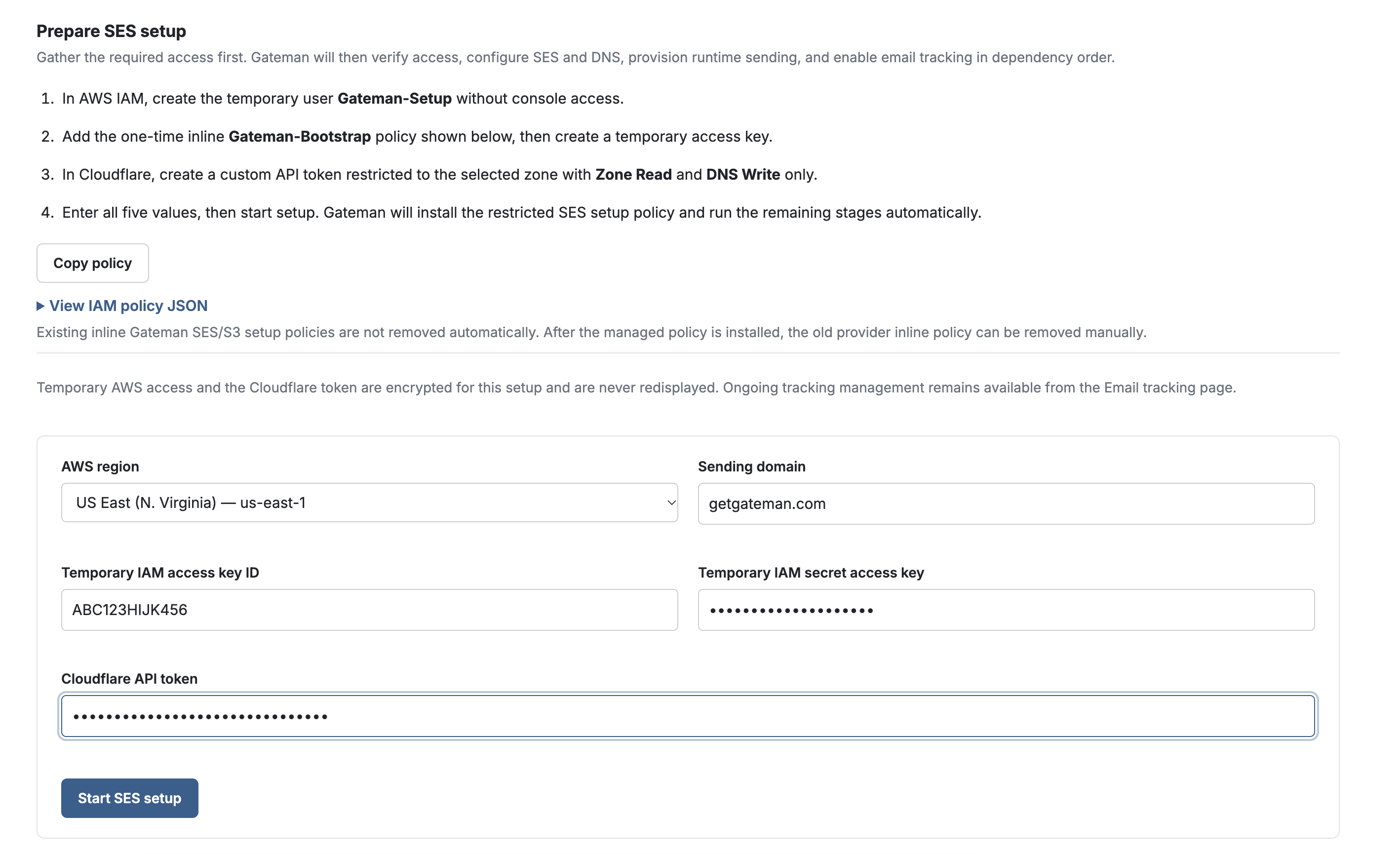
Gateman creates a scoped, permission-bounded control IAM identity and a separate least-privileged, permission-bounded runtime identity. It configures the SES sending identity, DKIM and domain verification, publishes DNS records through Cloudflare, and sets up the SES configuration set, SNS topic and subscription for event tracking. Premium tracking connects delivery, bounce, and complaint events to Gateman's permanent hard-bounce and app-scoped complaint suppression. The provisioned SES integration is connected to the Gateman app, replacing resource and permission setup across several provider consoles with one workflow.
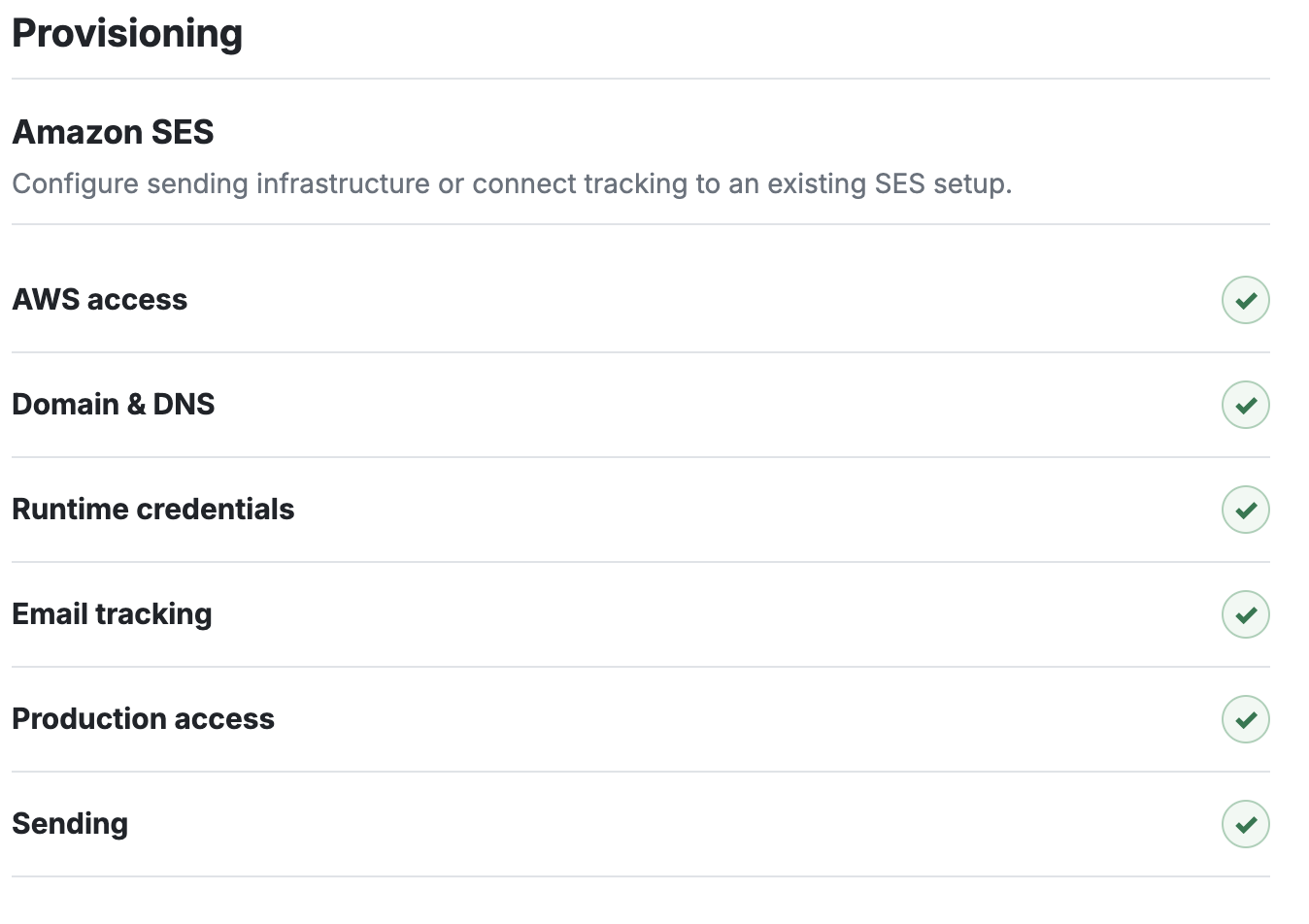
Provisioning is resumable, too. If an external verification takes longer, Gateman continues from completed stages instead of making the developer start over.
AWS production-sending approval, if required, is separate from provisioning; Gateman guides readiness checks and can submit the request, while AWS makes the approval decision.
Gateman publishes DNS through Cloudflare; with another DNS provider, the customer publishes the records Gateman supplies. The result is a configured SES integration ready for email.send—without manually connecting IAM, SES, DNS, and SNS. A credential manager can store setup credentials; Gateman uses them to provision and connect the infrastructure.
Choose the tool for the work in front of you
Choose 1Password to organize, share, and securely deliver secrets to people, scripts, or workloads. Its CLI, service accounts, and AI workflows support controlled access. Use a direct provider SDK when your application needs an operation Gateman does not provide or provider-specific control in its own code.
Choose Gateman when you want applications and coding agents to use repeatable provider integrations, reduce duplicated credentials and test plumbing, or provision SES without stitching the infrastructure together yourself. Start with the capability reference for the operation your app needs.
Use both when you want 1Password to manage team and application secrets while Gateman handles provider operations and SES provisioning. 1Password can protect the app's Gateman authentication; Gateman holds the provider credentials it needs. You can adopt Gateman for the repeated integration work without replacing your credential manager.
Stop rebuilding the same integrations
Start with transactional email: configure a Gateman app for the email capability, give your coding agent the bootstrap instructions, and have it implement appointment confirmations with an official client. Then carry the same integration pattern into the next application. For SES infrastructure, follow the provisioning guide.
Further reading
- Gateman: using coding agents
- Gateman: bootstrap context
- Gateman official clients: PHP, Node.js, Python, and Go
- Gateman: Contract v1
- Gateman: email sending
- Gateman: SES provisioning
- Gateman: stored credential retrieval
- 1Password: Security for AI
- 1Password: Load secrets into scripts
- 1Password: Service Accounts