
The short answer
Store API keys somewhere your application can access when it needs them, but where your source code—and ideally your development tools—cannot access more than necessary.
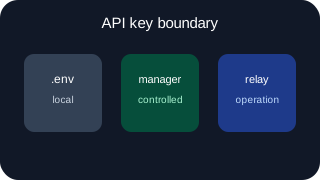
For a local project, an uncommitted .env file may be perfectly reasonable. For a deployed application, the hosting platform’s secret settings are usually a better home. If several applications or people need controlled access, a dedicated secret manager starts to make sense. And if the application does not actually need to possess the provider credential, a proxy or relay can remove it from the application altogether.
“Where should I put my API key?” bundles five questions into one.
The five different problems people mean by “secure API keys”
1. Avoiding hard-coded credentials
This is the most basic problem. A key written directly into application code becomes part of that code:
$stripe = new StripeClient('sk_live_...');
Anyone who can read the file can read the key. It can also be copied into backups, deployment packages and debugging output. Moving the value out separates application code and configuration.
2. Avoiding commits to git
Moving a key into .env does not help if .env is committed to the repository.
The arrangement is to add .env to .gitignore and commit an example such as .env.example containing names but no real values:
STRIPE_SECRET_KEY=
OPENAI_API_KEY=
This reduces the chance that a credential enters the repository. It does not encrypt the local .env file or restrict access to it. The ignore rule must also be in place before the file is added.
Does putting an API key in .env make it secure?
3. Managing environment-specific configuration
Development, staging and production often need different credentials. That is partly a security question, but it is also a configuration question.
Separate values stop test payments becoming real charges and staging emails reaching customers. They also allow development keys to have lower quotas or narrower permissions. An .env file, platform secret store or secret manager can all support this separation.
4. Controlling who or what can retrieve a secret
A secret can be stored outside the code and still be available too broadly.
If ten applications share one AWS access key, all ten inherit whatever that key can do. If every developer can read every production secret, the storage location has not created much of an access boundary.
This problem is about identity and permissions: what is asking, what may it retrieve, and can access be removed without changing every application?
5. Removing the provider credential from the application entirely
Most secret-storage approaches still end with the same event: the application receives the API key and uses it to call the provider.
That may be entirely appropriate. But it is not the only architecture.
An application can instead authenticate to an intermediary. The intermediary holds the provider credential, applies it to an authorised request and forwards that request to the provider. The application receives the provider response but never receives the underlying provider key.
This changes the trust boundary. It does not merely change where the same secret is loaded from.
Your application does not necessarily need your API key
Comparing the main storage approaches
Hard-coded credentials
Hard-coding requires no separate configuration, but makes the credential inseparable from the code. It may be committed, copied, indexed or sent to an AI assistant with the surrounding file. Rotation also requires a change wherever the value was duplicated. Even in a throwaway script, there is little benefit over supplying it as an environment variable.
Do not hard-code API keys in maintained software.
.env files
An .env file separates configuration from source code while keeping local development simple:
STRIPE_SECRET_KEY=sk_test_...
The application loads the value at runtime, commonly through a framework or a small dotenv library. Different environments can have different files, and the code refers only to STRIPE_SECRET_KEY.
This gives you:
- the value is not hard-coded;
- different configuration without code changes;
- simple local setup;
- the file can be excluded from git.
It does not, by itself, encrypt the credential, restrict which local process can read it or stop an authorised development tool from opening it. It also does not manage distribution. Someone still has to obtain the correct value and put it on each machine or server.
.env API keys are plain-text local configuration. Whether that is adequate depends on the machine, the credential and what it permits.
Hosting and deployment platform secrets
Most hosting platforms let you configure environment variables or secrets outside the deployed code. The platform injects them into the application at build time, startup or request execution.
This is usually the sensible default for a small production application. The key is not committed to git, deployment can be environment-specific, and access is governed through the hosting account.
Check the details:
- Can the value be revealed again in the dashboard?
- Which team members can change or view it?
- Is it exposed during the build as well as at runtime?
- Does changing it require a redeployment or restart?
- Can application logs or diagnostic pages print the environment?
The application still receives the secret. Code running with the same process privileges may be able to read it. That is simply the boundary this approach creates.
Dedicated secret managers
A secret manager stores credentials centrally and releases them to authenticated workloads or users according to policy. Depending on the product and setup, it may also provide versioning, audit records, automatic rotation and short-lived access.
The application commonly authenticates using a machine identity, cloud role or bootstrap credential. It then requests a named secret at startup or runtime.
This helps when several services or operators need controlled access, or manually maintaining platform variables has become awkward. It can show which workload accessed a value, which version is active and which applications retain access.
But a secret manager does not automatically keep the provider key out of the application. If the application retrieves the Stripe key, the Stripe key exists in that application’s memory and can potentially appear in an error report, debug dump or compromised process.
It also adds setup around identities, policies, caching and failure handling. For one small application on one platform, that work may buy very little.
Credentialed API proxies and relays
In a proxy or relay architecture, the application holds credentials for the intermediary rather than credentials for every underlying provider.
For example, instead of loading an AWS access key and calling SES directly, the application could send an authenticated email request to a relay. The relay checks whether that application may send email, applies the AWS credential and calls SES. The AWS credential stays at the relay.
This reduces the credentials present in each application and creates one place for app-level permissions. But the intermediary is now part of the request path, so its availability, latency, limits and supported operations matter. The application also needs a credential with which to authenticate to it, even if that credential is narrower than the one it replaced.
Gateman and secret-management alternatives
When .env is perfectly reasonable
An uncommitted .env file is a reasonable choice when:
- you are developing locally;
- the machine and user account are under your control;
- the file contains development or test credentials rather than production credentials;
- the credentials have appropriately narrow provider permissions;
- you have confirmed that
.envis ignored before adding it to git; - your backup, sync and support tools are not copying the file somewhere unexpected.
This may be all that is required locally. Adding a secret manager does not improve matters if its broadly permissioned access token is placed in the same file. A test Stripe key presents a different risk from a live AWS credential capable of administering an account.
Use separate keys where the provider allows it. Restrict their permissions. Do not use a production credential merely because it is already available and saves two minutes of setup.
When a secret manager makes sense
A dedicated secret manager becomes useful when secret distribution and access control have become a real operating problem.
Typical signs include:
- multiple applications need different subsets of a shared credential set;
- several people need controlled production access;
- credentials must be rotated without editing every deployment manually;
- workloads already have reliable machine identities;
- access records or secret versions matter;
- production runs across several hosts, regions or platforms.
Ideally, the workload authenticates through infrastructure identity rather than a long-lived master token stored beside the application. In a cloud environment, that might mean allowing a workload role to read specific secret paths.
If you need to store a permanent all-access secret-manager token in every application, examine whether you have simply moved the bootstrap problem. It may still be an improvement—particularly for rotation and central administration—but the permissions on that token determine the real boundary.
When a proxy or relay changes the trust boundary
A secret manager answers: “May this application retrieve this credential?”
A credentialed relay can answer a narrower question: “May this application perform this provider operation?”
Suppose an application needs to send transactional email. With a secret manager, it retrieves AWS credentials and calls the AWS SDK. With a relay, it asks the relay to send a message without gaining access to the underlying AWS credential.
Gateman is one implementation of this model for selected providers. An application authenticates to Gateman and requests an allowed capability. For example, email.send uses authenticated POST /send/ses; the application sends the documented message payload and environment, Gateman checks the email.send scope, captures staging/development messages locally, and uses the configured SES credential in production. The official PHP, Node.js, Python and Go clients can inject the environment, so the application can use the same production-intended send code across environments. For S3, Gateman can create a short-lived presigned operation so the file transfers directly between the application and S3 rather than passing through Gateman.
For services where relaying is not a good fit, Gateman can instead return an approved generic secret to an authorised application. That is closer to a secret-manager pattern: the secret remains outside the source code and permanent application configuration, but the application still receives it at runtime.
The relay model works best where an operation can pass through a stable, narrow interface without creating a bottleneck. High-volume or streaming AI requests may be better sent directly to the provider after retrieving an authorised key.
AI coding tools and production credentials
Codex, Claude Code and Cursor are useful partly because they can read and modify a working project. That same workspace access is relevant to API key security.
If .env is inside the workspace and the tool has permission to read the workspace, assume the tool may be able to read .env. An ignore rule for git does not necessarily hide the file from an editor, terminal agent or indexing process. Product behaviour and configured permissions differ, so check the tool and mode you are actually using rather than relying on the filename.
Exposure does not require the tool to deliberately search for secrets. A developer might ask it to diagnose configuration loading, print the environment, inspect a failing request or review every file involved in deployment. A key can then enter a prompt, command output, debugging transcript or generated log.
AI coding agents and API credentials
The cleanest control is to limit what the development environment ever receives:
- keep production credentials out of local
.envfiles; - use separate test or development credentials;
- grant those credentials narrower permissions where possible;
- exclude secret files from workspace indexing or tool access when the product supports it;
- avoid commands that dump the entire environment;
- redact credentials from fixtures, logs and error reports;
- perform production deployment through a controlled path rather than from a developer laptop containing live keys.
If an application uses a relay in production, the development workspace may need only its development relay identity. It never needs the underlying AWS or Stripe credential. That does not eliminate secret handling—the relay identity is still sensitive—but it limits what an accidental disclosure can directly expose.
Hiding a key from one tool achieves little if it remains available to another tool, shell history or application logs. Treat the development environment as a whole.
Practical recommendation by app type
A local experiment or throwaway script
Use an environment variable or an uncommitted .env file with a test key. Give the key only the permissions and spending limit needed for the experiment. Do not hard-code it just because the script is short.
A small application deployed on one platform
Use a local .env file for development credentials and the hosting platform’s secret settings for production credentials. Keep production values out of the development workspace. This is a sound default for many real applications.
A small team with several applications
Consider a secret manager when copying credentials between platforms and people has become difficult to control. Give each workload access only to the secrets it needs. Prefer workload identity over distributing one broad secret-manager token.
Where several applications perform the same narrow provider operation, consider whether a relay would produce a cleaner boundary and remove repeated provider setup.
An application using AI coding tools heavily
Assume the tool can access whatever its workspace and terminal permissions allow. Use development credentials locally. Keep production credentials in the production deployment environment or behind a separate service boundary. Review generated debugging commands before running them when they inspect configuration or environment variables.
An application that needs only a narrow provider capability
Ask whether the application needs the provider credential at all. Sending email, verifying an anti-bot token, creating a presigned upload or making a constrained provider request can often be handled through a relay.
The trade-off is dependence on that relay. Check whether its permissions, failure behaviour and supported operations suit the application. If direct provider access is important, a secret manager or platform-injected secret may be the better design.
Conclusion
There is no universal best place to store an API key because storage is only one part of the problem.
For local development, an uncommitted .env file with non-production credentials is often enough. For a small deployed application, platform-managed secrets are usually the practical default. A secret manager becomes useful when distribution, rotation and access policy justify it. A proxy or relay goes further by allowing the application to perform selected operations without receiving the provider credential.
The most useful question is not simply, “Where is the key stored?” It is: “Which people, tools and applications can ever obtain it—and do they actually need it?”