
If your community site, membership product or customer portal accepts a few photos or documents, saving uploads on the application server can be a sensible choice. It is easy to build, uses the filesystem APIs you already know, and adds no provider account to manage.
The decision changes as uploads become part of the application’s operating burden. If you are planning server migrations, adding another app instance, or separating deployments from persistent files, object storage such as Cloudflare R2 can give those files a home independent of the web server. Gateman can reduce the provider-specific signing code needed to add that workflow: it creates a short-lived R2 request, while the file itself goes directly from the browser to R2.
Local storage is often the right place to start
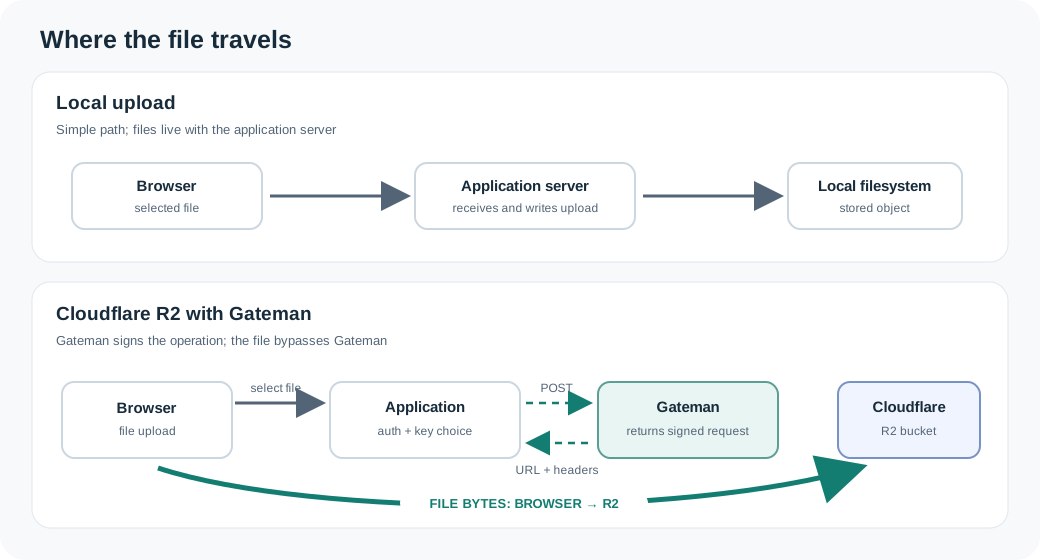
A local upload flow is direct: the application receives a file and writes it to disk. There is no object-storage account, bucket, credential setup or extra network request to coordinate. For a small, stable site on one server, that simplicity may be all you need.
The trade-off is that uploaded files become part of the server’s persistent state. You need enough disk space and backups that include the upload directory, and you need a restoration plan that keeps files in sync with the database records that reference them. When moving hosts or changing how the application is deployed, the files must move too. Multiple application instances also need a way to see the same uploads; a file written to one instance’s local disk may not exist on another.
None of those problems is inevitable. If uploads are few, the host is stable, and your backup and deployment process already covers them, staying local avoids extra moving parts.
What changes with R2?
Cloudflare R2 stores objects separately from the application server. An object is addressed by a bucket and key; keys are names such as members/42/profile.jpg, not real directories. Your application still decides what a key means and which user may access it.
R2 can suit a site when you want the application deployment and file lifecycle to be independent, or when several app instances need to use the same stored objects. You do need to create and manage the bucket, configure credentials and permissions, and decide how objects are accessed and retained. R2 is object storage, not a complete media library: it does not automatically provide image transformations, user permissions, upload moderation or a polished public delivery layer.
R2 pricing has separate storage and request dimensions. Cloudflare’s current Standard tier lists monthly storage charges and Class A and Class B operation charges, with a monthly free tier; Internet egress is listed as free. Infrequent Access has different operation rates and retrieval charges. Check the current R2 pricing against your expected storage, reads, writes and retrieval pattern. A free egress line does not make every use free, and object storage still has configuration and maintenance work.
Add direct uploads without writing the signing integration
In a typical R2 browser upload, the application first obtains a presigned request. The browser then sends the file directly to R2. The application server coordinates authorization and records the result, but does not need to proxy the file bytes.
Gateman provides an authenticated POST /r2/presign endpoint under the r2:use capability. The application asks for a put or get operation and supplies the bucket, object key, jurisdiction and expiry. Gateman uses the R2 credentials configured for that application to sign the request, then returns its URL, HTTP method and required headers. The application authenticates to Gateman with its normal Gateman credentials; it does not need to load the R2 signing secret into its runtime for this operation. See Use Cloudflare R2 for the request contract and Gateman authentication for the authenticated request pattern.
For a community profile-photo upload, the flow looks like this:
- A signed-in member selects a photo.
- The application checks the member’s upload permission, validates the declared file size and type against its upload rules, and chooses an object key. If the application needs to inspect actual file contents, it must arrange that validation separately. The key might include an internal member identifier and a generated filename.
- The server-side application authenticates to Gateman and requests a PUT presign for the chosen bucket and key.
- Gateman returns a signed URL,
PUTmethod and any required headers. A successful presign only means the request was signed; it does not mean an object has been uploaded. - The browser sends the file directly to R2 using the returned URL, method and headers, then checks R2’s response.
- The browser reports the result to the application. The application records the object key and metadata according to its workflow. Where independent confirmation matters, the server verifies the object’s existence or properties through an appropriate storage operation before treating it as available.
Gateman capability authorization and member authorization are different checks. The r2:use scope lets the application request supported presigned operations; your application still decides whether this particular member may upload, and which bucket and key to use. Gateman does not add user-level object permissions, create buckets, register keys or transfer files. The actual transfer does not pass through Gateman, and the direct R2 request consumes no additional Gateman operation.
If the photo should remain private, do not make the bucket or object publicly readable just to simplify display. The application can request a short-lived authenticated GET presign when an authorized member needs to view it. Treat a presigned URL as a bearer link: anyone who obtains it can perform the signed action until it expires.
A few details make browser uploads work
A browser upload from your site’s origin may require an R2 bucket CORS policy that allows that origin, the PUT method and the request headers used. CORS governs browser access; it does not grant application users permission to upload. Configure only the origins and headers your application needs, using Cloudflare’s R2 CORS guide.
Use the URL and every header returned by Gateman as-is. If you sign a Content-Type, send that matching header with the upload. The URL expires after the requested interval (Gateman accepts 1 to 3,600 seconds), so request it shortly before use and handle expiration by requesting another one. Keep it out of logs and avoid exposing it to unrelated clients.
Choose object keys on the server rather than trusting a client-provided path. Before issuing a presign, the application can validate declared file size and type metadata according to its upload rules. A direct browser upload does not automatically let Gateman or the application server inspect the file’s actual contents; arrange a separate inspection step if that matters. A signed Content-Length, when used, is part of the request signature; it is not a separate Gateman upload-size policy. R2 responds to the browser during the direct transfer, so a browser-reported success is not independent server confirmation. Where availability or integrity matters, have the server verify the object’s existence or properties through an appropriate storage operation before treating it as available. Cloudflare documents that presigned URLs are for its S3 API domain and are not used with custom domains; public distribution is a separate access design.
Keep the choice proportional
Local files remain a good fit when the site is small and the current host, backups and deployment model already handle them well. R2 becomes worth considering when persistent uploads complicate those arrangements or when multiple instances need shared object storage.
When that is the right move, Gateman lets you add the presigning step through an authenticated application capability instead of implementing and maintaining that R2 signing path in every application runtime. You still own the bucket setup, user authorization, upload rules and confirmation. For a broader look at where Gateman removes repeated provider integration work, see Simplifying Multiple Provider Integrations. If you use a coding agent to build the feature, Gateman’s bootstrap workflow gives it the app-specific capability context to follow.