
You know the Cloudflare setting you need is somewhere in the dashboard. You have searched the menus, the labels are not quite what you expected, and you would rather not spend the afternoon tracing documentation and API examples. A coding agent could help find the right Cloudflare API operation and make the configuration change.
There is one catch: the agent should not need your reusable Cloudflare API token to do that work.
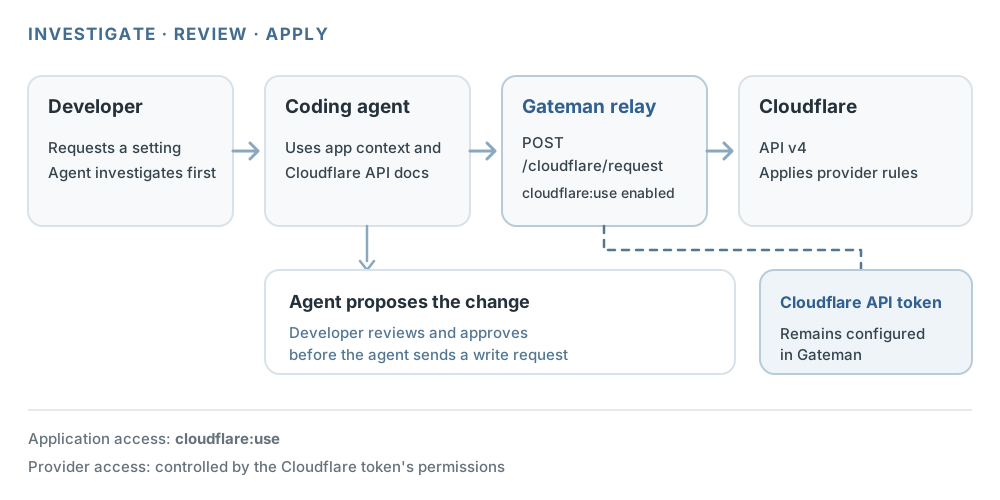
Gateman gives an application an authenticated route to supported Cloudflare API requests. The agent can investigate through the application’s Gateman context, explain the proposed change, and—after you approve it—implement the request through Gateman. The configured Cloudflare token stays with Gateman.
Ask the agent to find the right setting
Imagine you are hardening the security configuration of an existing website. A JavaScript-related zone setting is difficult to locate in the current dashboard. You authorize a coding agent to research the available Cloudflare API functionality and inspect the relevant configuration.
The agent can search Cloudflare’s API reference, then use the application’s enabled Gateman Cloudflare capability to inspect the zone. It can report what setting appears relevant, what the current value is, and what request it proposes to make. You review the reasoning and authorize the write as a separate step in your development workflow.
That split is useful: the agent can do the tedious API research and implementation, while you keep control of whether a configuration mutation happens. The human review is your workflow decision. Gateman does not create separate read and write scopes for Cloudflare.
Give the agent an application path, not the provider token
First, select a Gateman application with Cloudflare configured and cloudflare:use enabled. Gateman provides generated, application-specific bootstrap instructions for that application. The agent uses them to configure the official client, authenticate to Gateman, and call POST /client/get for the application’s current authorized capability context; that context route requires client:read.
That context tells the agent which capabilities the application may use and links to the relevant documentation. It does not return the Cloudflare token. The agent then follows the Cloudflare capability reference and uses the client’s generic authenticated request method to call POST /cloudflare/request.
The request uses the native Cloudflare API model: a method, relative path, optional structured query and headers, and a provider-native body. Gateman sends it to Cloudflare API v4 using the token configured for that application. It does not turn Cloudflare into a new Gateman-specific resource language, and it does not guarantee every Cloudflare endpoint can be represented by the relay contract.
Cloudflare still decides whether the token can perform the requested operation on the target account, zone, or resource. The application also needs protected Gateman signing material so that it can authenticate its requests. The agent does not need the underlying Cloudflare token, but this is not a credential-free integration.
Review the change, then make it
For the security-hardening task, the agent can first make a read request, summarize the relevant setting, and present the proposed write request. After you approve it, the agent can send the authorized mutation through the same application route. You then verify the resulting configuration in the application or Cloudflare.
This example is intentionally about the workflow, not a made-up API call. Cloudflare’s zone-setting API includes operations for retrieving and editing individual settings, but the exact setting, supported value, request body, and security outcome depend on the feature and zone. The agent should identify those details from current Cloudflare documentation and the target zone before it proposes a change. Cloudflare documents the zone-setting API.
Gateman’s relay accepts bounded native requests using GET, POST, PUT, PATCH, or DELETE. It fixes the destination to Cloudflare API v4, validates the path and caller-supplied headers, and limits request body size. Cloudflare validates the operation and payload. The relay returns a bounded provider response; it does not automatically discover resources, paginate, retry, reconcile the result, or decide whether a policy outcome is safe for your application.
Turn off the application capability afterward
When the configuration task is complete, you can disable cloudflare:use for the Gateman application. That prevents subsequent authenticated Cloudflare relay operations from that application. You can do this without rotating the Cloudflare token just to end this application’s use of the relay.
Disabling the Gateman capability does not delete the configured Cloudflare credential or revoke the underlying Cloudflare token. It also does not remove access granted independently elsewhere. This is capability control at the application boundary, not a separate temporary-token mechanism.
A practical fit for agent-assisted maintenance
Direct Cloudflare API access may already be the right choice for a team that has a well-managed token workflow and an established integration. Gateman is useful when you want the Cloudflare operation available through the same authenticated, app-scoped integration model as the rest of your application, without another provider-token handoff to the agent.
The development path stays concrete:
- Configure Cloudflare for the Gateman application and enable
cloudflare:use. - Give the agent the generated bootstrap instructions and the configuration task.
- Let it retrieve current app capability context and research the relevant Cloudflare API operation.
- Review the identified setting and proposed change.
- Approve the write, then verify the resulting configuration.
- Disable the application capability when further Cloudflare relay use is unnecessary.
Gateman does not make every Cloudflare configuration change automatically safe or supported. It gives an agent a documented way to investigate and carry out a supported native API operation, while the provider credential stays configured behind the application’s relay. For a hard-to-find setting, that can turn a frustrating dashboard hunt into a reviewable development task—without giving the agent your Cloudflare API token.