
Amazon SES can look like an easy choice for a small website: AWS-managed email infrastructure, integration with an application you already run, and pay-as-you-go sending. But if a handful of appointment confirmations or membership notifications is all you need, spending an afternoon joining up AWS permissions, email authentication, DNS, event tracking, and application code can feel out of proportion.
The decision is not only what each email costs. It is whether the provider’s operating cost and the engineering time to make it useful fit your project. Gateman Premium can automate supported SES setup in as little as three minutes, making SES practical for developers who would otherwise choose a simpler service to avoid the setup work.
SES is economical to send with; setup still takes engineering time
SES offers pay-as-you-go sending, including à-la-carte outbound pricing of $0.10 per 1,000 emails. AWS also offers an Essentials plan starting at $0.16 per 1,000 emails, which may be the default for new accounts. Additional charges can apply, so check AWS’s current SES pricing and the plan selected for your account before estimating costs.
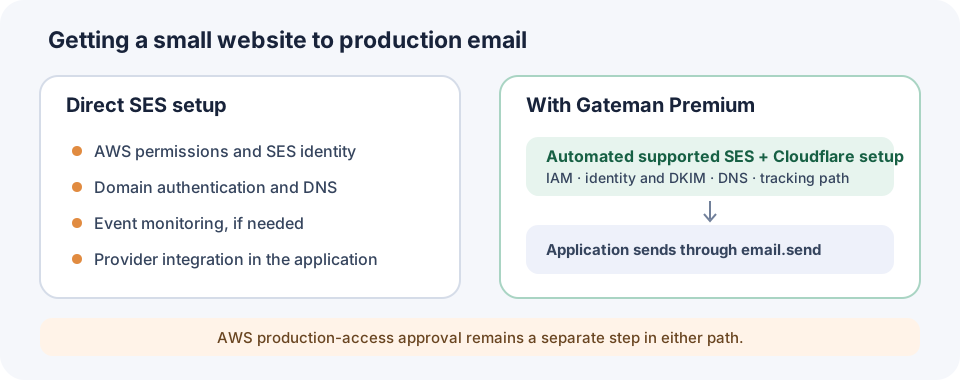
That per-message price is attractive, but it is not the whole decision. A typical domain-based setup can involve choosing the AWS account and region, creating and verifying a domain identity, publishing DKIM records, arranging IAM permissions, integrating the send operation, and deciding how to observe delivery and bounce events. Configuration sets and event destinations can add more pieces. Your exact steps depend on the account and design; not every SES user needs to configure every item manually.
SES accounts can also start in a sandbox. In that state, sending is restricted, and moving to production requires a separate request for the relevant region. AWS reviews that request; provisioning email infrastructure does not grant production approval. See AWS’s sandbox and production-access process.
For a modest site, this can be the awkward part: the email requirement is small, while connecting all the provider pieces is a real infrastructure task.
Choose the service that matches your available time
A simpler transactional email service may be the right fit if it gets your site sending quickly and its price, features, and limits suit your needs. Your hosting platform may already include an email sending feature. If you know AWS well, a direct SES SDK integration can also be a sensible choice: you control the implementation and provider setup yourself.
SES becomes more compelling when you value its AWS fit and sending economics enough to own the surrounding setup. A small volume does not automatically make SES worthwhile, and Gateman is not a prerequisite for using it. But if the configuration work is the reason you would rule SES out, automating that work changes the calculation.
Gateman handles supported provisioning work
With Gateman Premium, you provide the AWS region, sending domain, temporary AWS setup access, and a restricted Cloudflare DNS token. Gateman provisions the supported resources in your AWS account: permission-bounded control and runtime identities, the SES domain identity and DKIM, required DNS records including DMARC handling, and the configuration set and SNS event path used for tracking. It also connects SES events to Gateman’s email status and suppression functions.
Gateman records workflow progress so a recoverable interruption can be resumed, and removes the temporary setup access after persistent control access is established. The AWS account and its underlying resources remain yours. Automated DNS publishing currently supports Cloudflare; it does not mean that Gateman can configure every DNS provider.
Completed setups have taken as little as three minutes. The existing provisioning article compares this with approximately 20–30 minutes of comparable manual configuration. Those figures describe the infrastructure setup boundary, not a promise that every account will finish in that time: DNS propagation, external waits, account state, and other conditions can affect completion. AWS production-access review is a separate step and is not included in that timing.
Read the [Amazon SES provisioning walkthrough](/articles/amazon-ses-provisioning/) for the actual console flow and setup inputs, or consult the SES provisioning capability guide for prerequisites and supported resources.
Send the website’s email through one application path
Provisioning only helps if it connects to a usable application integration. With the email.send capability, the website sends an authenticated request to Gateman using the documented SES message structure. The application uses its Gateman runtime identity; it does not need AWS signing code or the SES sending credential. See the email sending contract.
For development and staging, Gateman validates and captures supported messages in its local mailbox without calling SES. In production, the same application email implementation sends through the configured provider, subject to SES identity, account, and sending permissions. That lets a developer exercise the confirmation flow before launch without maintaining a separate mock mail transport.
A small appointment website example
Imagine a solo developer building an appointment-booking site. It needs booking confirmations, schedule-change notifications, and eventually production email. With direct SES integration, the developer coordinates AWS identity and permissions, domain authentication and DNS, any chosen event monitoring, then adds SES-specific sending code and tests.
With Gateman, the developer runs the supported provisioning workflow, enables email.send, and implements the site’s transactional messages against the documented capability. Development and staging messages are captured for inspection; production messages go through the configured SES provider once the AWS account is permitted to send. The developer still decides when to send, who should receive each message, and how the booking flow handles a failed send.
For newsletters, Gateman can provide the sending infrastructure, while the website or its mailing-list software manages subscribers and campaigns.
Is SES worth it for your site?
Choose a simpler hosted service when low setup effort is your main priority, or use a direct SES integration when you are happy to own its configuration and maintenance. Consider SES with Gateman when you want SES for your application but would rather not spend the project’s time coordinating its supported IAM, SES, DNS, and tracking setup yourself.
You do not need enterprise email infrastructure just because your site sends email. You do need an implementation that fits the amount of time you can spend operating it. Gateman makes the SES option easier to act on: automate the supported provisioning, connect the application through email.send, and keep AWS production approval and the application’s email responsibilities clear. Explore the SES provisioning guide to see whether that trade-off fits your project.