
Selecting Stripe webhook events is one of those small jobs that keeps coming back. A feature changes, the callback URL moves, or a new event becomes part of the application’s workflow, and someone has to revisit the endpoint configuration and keep its event list in sync.
Stripe already provides an API for creating and updating webhook endpoints. The friction is the repeated setup work and the coordination around it: choosing the events the application actually handles, updating the destination, and keeping the signing secret available to the receiver. Gateman offers a focused, authenticated setup operation for that task. Send the callback URL and event list once; Gateman uses the application’s configured Stripe credential to create or reconcile its supported endpoint.
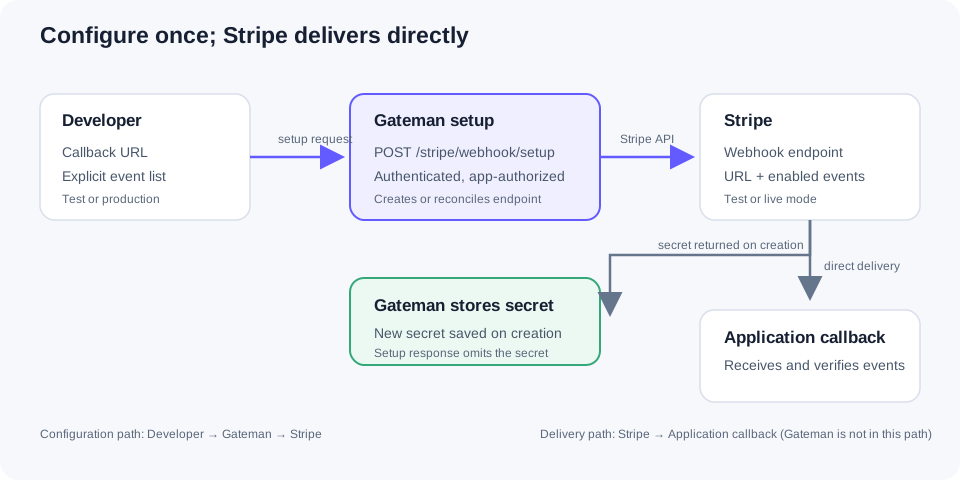
Set the callback and event list in one request
With the stripe:webhook:write scope, an application can call POST /stripe/webhook/setup using Gateman Contract v1 authentication. The request contains an environment, an HTTPS callback URL, and the Stripe event names the application needs:
{
  "environment": "staging",
  "callback_url": "https://app.example.com/webhooks/stripe",
  "events": [
    "checkout.session.completed",
    "payment_intent.payment_failed",
    "payment_intent.succeeded"
  ]
}
These events suit a Checkout flow that records successful completion and responds to payment success or failure. They are examples, not a universal subscription list. Choose only events your handler uses, and review Stripe’s current event type reference as the application’s behavior evolves.
The request list is explicit, so a code change can update the configured subscription without someone selecting each event again in a dashboard. Gateman validates the request shape and HTTPS callback, removes duplicate event names, and lets Stripe validate the event names and provider configuration. Its response identifies the configured endpoint and the resulting callback and events; it does not include the signing secret.
Let configuration changes stay deliberate
Gateman tracks one supported live endpoint association and one supported test association for each application. On the first setup request for an environment, it creates the endpoint in Stripe using the configured Stripe credential and stores the returned signing secret in the matching Gateman credential slot.
When the callback URL or event list changes later, send the updated values in another setup request. Gateman checks the tracked Stripe endpoint and updates its URL or subscriptions when needed. An ordinary update does not issue or replace the endpoint’s signing secret, so the secret already held by the receiving application remains appropriate.
If Stripe reports that the tracked endpoint no longer exists, Gateman creates a replacement. Stripe returns a new signing secret with that creation, and Gateman replaces the corresponding stored value. The setup response still omits the secret. The application retrieves it separately only if it has the independently granted stripe:webhook:read scope.
If setup fails after contacting Stripe, check the resulting endpoint state before retrying; an error response does not always mean Stripe made no changes.
This is a deliberately bounded workflow: it configures Gateman’s tracked endpoint for the application. It does not adopt arbitrary endpoints found in a Stripe account or manage an unrestricted collection of destinations. Stripe’s native API remains available when your use case needs direct management beyond this supported operation.
Keep Write and Read permissions separate
stripe:webhook:write authorizes endpoint setup and reconciliation. It does not grant stripe:webhook:read or the general stripe:use capability. If the application must retrieve a signing secret from Gateman, grant Read separately and call POST /stripe/webhook-secret for the intended environment.
Treat the returned value as a server-side credential: keep it out of source, logs, browser code, URLs, and user-visible errors. The application’s webhook receiver uses that secret to verify Stripe’s signature on the raw request. The console does not reveal stored secret values, and Write alone does not provide the secret to the application.
See the Stripe webhook Write contract and the independent Stripe webhook Read contract for authorization and request details.
Stripe delivers events directly to your application
Gateman is in the authenticated configuration path: the application asks Gateman to configure Stripe, and Gateman calls Stripe’s API with the application’s configured Stripe credential. Once configured, Stripe sends webhook requests directly to the callback URL. Gateman is not a delivery relay and does not receive or verify those event requests.
Your application remains responsible for verifying the Stripe signature, safely handling duplicate or retried deliveries, and applying the appropriate business logic. For Stripe’s own webhook guidance, see verify webhook signatures and handle duplicate events.
Keep test and live setup distinct
Use staging or development when configuring the Stripe test-mode endpoint. Those two Gateman labels refer to the same test association and test credential slot; they do not create separate staging and development endpoints. Use production for the live Stripe endpoint and credential.
This gives the application a practical setup sequence: configure and exercise its test callback using Stripe test events, then configure the production callback with production when the live integration is ready. Keep the environment explicit in each setup request so the endpoint and signing secret map to the intended mode.
Give a coding agent the desired endpoint, not a dashboard chore
A developer can ask an agent: “Configure our Stripe webhook at this callback URL for these specific events.” The agent can use the application’s Gateman bootstrap, inspect its authorized capability context, and follow the Stripe webhook Write reference to implement the setup call. The developer still controls the application’s enabled scope and runtime authentication material.
The Gateman coding-agent bootstrap guide covers the broader handoff. This article focuses on the concrete webhook job: providing the callback and event list, keeping test and live configuration straight, and handling the signing secret that Stripe issues when an endpoint is created.
If you are calling Stripe directly, the same principle applies: maintain the endpoint’s enabled_events from the events your application actually processes. Stripe documents both creating and updating webhook endpoints. Gateman uses that Stripe API behind a narrow app-authorized operation and keeps a newly issued signing secret in the application’s configured credential model.