
When a small agency takes on another client, the owner has to decide who can work on the new application, what they need to configure, and how that access will be removed when the project changes hands. Repeating those decisions across separate console accounts—and passing provider keys around to make integrations work—creates avoidable admin for every onboarding and reassignment.
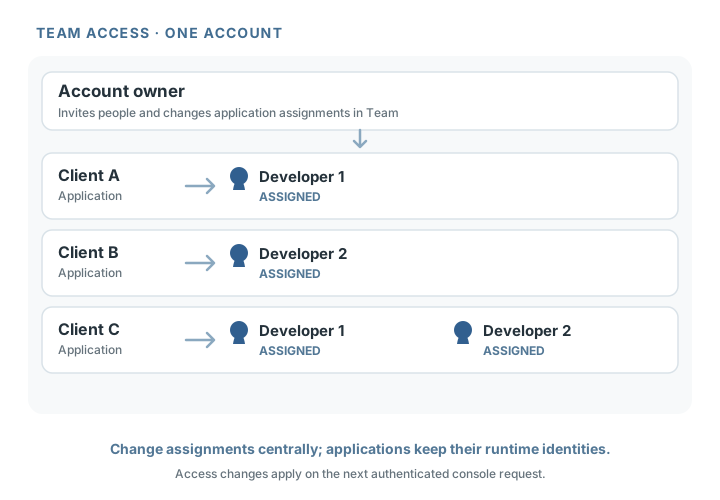
Gateman gives an account owner one Team page to invite people and assign the applications they can manage. A developer can be added to Client A's application, moved to Client B later, and disabled when they leave. Those changes govern the developer's Gateman console access. The applications authenticate to Gateman separately, so a team change does not interrupt their runtime requests.
Manage who can access each application without disrupting the applications themselves. For supported provider operations, this also means a developer can build against Gateman's documented capability without routinely receiving the underlying provider credential.
Give each developer the applications they need
Imagine an agency operating three client applications through one Gateman account. A new developer is joining the team for Client A. The owner opens Team, invites the developer by email, and selects Client A's application. Once the developer accepts, it appears in their console access, without granting access to the agency's other client apps or making the developer an account owner.
The owner can choose between two application assignments:
- Selected applications gives access only to the applications explicitly chosen. A new application is not added automatically.
- All applications includes every current application and applications added to the account later.
These are application assignments, not fine-grained roles inside an application. Owners manage the account, team, billing, and applications. Members can manage assigned applications and the settings available for them in the console, but cannot manage the team or billing, or create and delete applications.
That gives a small team a practical boundary: assign a contributor to the client apps involved in their work, while keeping account-level administration with the owner. See Teams and access management for the complete rules.
Reassign work from the same place
When the developer moves from Client A to Client B, the owner updates the member's selected applications on Team. They can remove Client A, add Client B, or grant all-app access if the person's responsibilities now span the agency's portfolio. A developer with selected access does not inherit access to a new client application just because it is created in the same account.
Gateman checks current membership and application access on each authenticated console request. The reassignment is enforced on the next request: access to Client A is denied, while Client B remains available.
When someone leaves, the owner can disable their membership from Team. Their next authenticated console request is denied, even if their session has not expired.
Disabling a membership preserves the person's Gateman user account. The current Team interface does not offer a re-enable action; if the person returns, the owner can send a new invitation for them to accept.
Keep application operation independent
In the agency example, the team membership belongs to the human developer. Client A's application separately authenticates to Gateman's runtime API using its own application signing configuration. Disabling the developer's membership does not disable the application or rotate its signing credentials. The application can continue making its authenticated runtime requests while the owner changes who may manage it in the console.
That separation reduces disruption during a handoff. The agency can remove a departing developer's console access without turning off the client's email flow or changing the application's runtime identity. It is not a substitute for reviewing access in the agency's source control, hosting, cloud, and deployment systems, which remain separately managed.
Reduce provider-key handoffs for supported work
For a supported mediated operation, the application authenticates to Gateman and requests the documented capability; Gateman uses the configured provider credential for the provider call. The application still needs its own Gateman runtime authentication.
This helps the agency avoid making a provider key part of every developer handoff just to implement a supported integration. The developer can work from the capability contract, while the application uses its runtime identity and Gateman handles the configured provider credential at the provider boundary. The same idea applies to other supported operations, such as Stripe requests, where the capability keeps the provider credential behind Gateman.
Team assignment does not guarantee that members cannot view or change sensitive settings. Members can manage assigned applications, including provider credentials and sensitive settings wherever the console exposes them. Gateman also supports authorized retrieval for some stored credentials. The practical benefit is narrower: teams can coordinate who manages each application without routinely copying provider credentials to every developer's machine or treating key distribution as the default integration workflow.
Help a newly assigned developer get started
Once the owner has assigned the relevant application, a developer implementing a supported integration can give a coding agent Gateman's app-specific bootstrap instructions and the documented capability reference. The agent can follow the application's configured integration path without treating the team invitation as runtime authentication or assuming that human console access grants application scopes.
Read the coding-agent guide and bootstrap context for that workflow. The Security overview explains how console access relates to application authentication.
A simpler team handoff
For the agency, onboarding a developer to Client A means one invitation and an application assignment. Reassigning them to Client B means updating that assignment. Offboarding means disabling the membership. Gateman applies each change on the next authenticated console request, while the applications continue using their own runtime authentication.
Start with the client applications the person needs to manage, choose selected access, and adjust it as project responsibilities change. Your team gets a clear place to handle application access—and supported integrations no longer need a provider-key handoff as a routine part of getting a developer productive.