
If you disable a developer's Gateman membership while they still have the console open, can they keep making protected requests? No. Their existing browser session does not preserve access: Gateman denies the next protected console request.
The browser may still hold its session cookie. That only means the session has not expired; it does not override the account's current membership or the developer's application access. An owner can disable the membership once, without waiting for the browser session to expire or asking the developer to sign out.
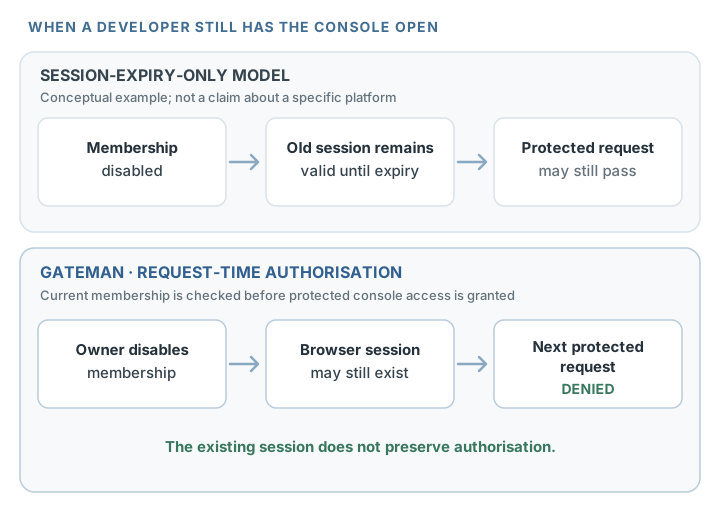
A browser session is not ongoing authorisation
A session lets Gateman recognise a signed-in browser. For a protected console request, Gateman also checks whether the person currently has an active membership in the account and is allowed to access the relevant application. These checks happen against current account state; the browser's earlier sign-in does not make that state permanent.
That distinction matters when someone is offboarded. With a policy that relies only on session expiry, an old session may remain usable until its lifetime ends. Gateman evaluates current membership when protected console requests arrive, so the owner does not have to wait for an expiry timer before the access change takes effect.
The comparison is about where an access decision is made, not about every other platform's behavior. In a conceptual session-expiry-only model, the request relies on the still-valid session. Gateman checks current access while handling each protected console request, so a session that authenticated earlier cannot carry an outdated membership forward.
What happens when the developer tries again
Imagine a contractor has a Gateman application page open in one browser tab. The account owner opens Team, chooses Disable for the contractor, and confirms. Gateman saves the membership as disabled.
The contractor then tries to open another protected console page or perform a protected action from the still-open browser. The browser may send its existing session cookie, but Gateman checks the account's current membership for that request. Because the membership is disabled, the request is denied. The old session does not restore the contractor's application access.
The owner does not need access to the contractor's device, a browser sign-out, or a session-expiry window to enforce the membership change. The next protected request is the point at which Gateman applies it.
This applies whether the next request loads a protected console page or submits a protected console action. The owner does not have to force the browser through a new login first; Gateman evaluates the membership state already saved to the account.
This is request-time enforcement. It does not cancel work already in progress or remove information that was delivered to an open page before the membership was disabled. The practical guarantee is that a later protected request is checked against the saved membership state.
Application access follows the same current state
Gateman also checks the member's application access. If an owner removes an application from a member's selected access, a later protected request for that application is denied; the existing browser session does not preserve the earlier assignment. Access to other applications still assigned to that active member can continue.
Disabling the membership removes that person's console access to the account. It does not independently disable a Gateman application or change its runtime authentication. Human console access and application authentication are separate: the application continues to authenticate with its own signing configuration and enabled capabilities. See Authentication for the runtime model.
Make the change from Team
When a developer's Gateman access should end, an account owner can open Team, disable that member, and confirm. Gateman applies the change to the next protected console request, even if the person remains signed in. For the broader invitation, assignment, and disable workflow, see the Teams and access management guide.
A developer's browser session can outlive their membership, but it does not preserve authorisation to protected Gateman console resources. Disable the membership from Team, and Gateman denies the next protected request without requiring the old session to expire.