
You are adding email to a small website. Or payments, file uploads, or one outside API. The feature is clear; the credential setup is the part that starts to spread: an API key in local configuration, another value in the hosting dashboard, and a reminder to update both when the provider key changes.
It is reasonable to ask whether a dedicated secrets manager is worth the extra setup. A .env file or hosting environment variable is often the simplest workable answer. The better question is what your application needs to do with the credential—and how much secret delivery and provider integration you actually want to operate.
Environment variables can be a reasonable choice
Local .env files are convenient because frameworks make them easy to use. Kept out of source control, limited to the values an app needs, and handled carefully, they can be appropriate for a small project. Production values supplied by a hosting platform are different from a development file on a laptop, and managed secret injection can add access controls without changing the application’s configuration pattern.
The risks depend on how credentials are handled. A .env file committed to a repository can expose keys. Environment variables still make the credential available to the running application, which needs it to authenticate directly to the provider. Values may also be copied between developer machines, CI, staging, and production; a broader provider key can be shared with more systems than the specific feature requires; and rotating a key may mean updating each destination and redeploying.
None of this means environment variables are inherently unsafe or that every application needs another service. If one app has one provider, the key is narrowly scoped, deployment access is controlled, and rotation is manageable, a direct SDK and environment configuration may be a proportionate solution.
The balance changes as environments, developers, and integrations multiply. Repeated credential setup and provider-specific code become ongoing work, and developers may take shortcuts simply because the safer alternative looks like a separate infrastructure project.
What a secrets manager adds
Products such as HashiCorp Vault, Doppler, Infisical, and 1Password help teams store and deliver credentials under controlled access. Their exact models differ. Vault includes secret engines, authentication and policy controls, and leases for dynamic credentials. Doppler organizes configuration and secrets across projects and environments and can deliver them to running processes. Infisical offers secret management and workload integrations. 1Password supports controlled access and loading secrets into scripts and processes.
These tools are useful when a team needs a shared source of truth, centralized access administration, deployment integrations, audit history, rotation workflows, dynamic credentials, or broader lifecycle controls. A secrets manager can reduce how often people handle raw values, but when an application receives a provider key and calls the provider itself, the application still implements and maintains that integration.
That distinction matters for a small feature. If the task is “send an order email,” you may not need to build a general secret-delivery architecture before the application can send it. You might need the email operation performed through a defined service boundary.
Ask whether the app needs the key or the operation
For supported mediated operations, Gateman lets an application authenticate to Gateman and request the permitted provider action. Gateman checks the app’s capability and uses the provider credential configured for that application. The underlying provider key is not returned to the application for that operation. The app still protects its Gateman signing credentials and can call only the capabilities it has been granted.
For example, a small website sending a receipt can use Gateman’s documented email contract through an official client. The app provides the message fields; Gateman applies its configured email-provider credential. The developer does not need provider-specific authentication and sending code in that application for this supported operation. Development and staging email is captured in Gateman’s mailbox, while production requests use the configured provider.
This is different from retrieving a secret and making the provider call yourself. It also is not a universal API proxy: Gateman supports specific operations under documented contracts.
Storage uses a different path
Suppose the feature is user uploads to Amazon S3 or Cloudflare R2. Gateman can authorize and create a presigned request for a supported object operation. The application then transfers the file bytes directly to the storage provider using the returned URL and headers; Gateman does not carry the file contents.
The application remains responsible for deciding which user may upload or download, choosing safe object keys, and confirming the provider’s response. A presigned URL is a temporary bearer link, so the application should protect it and request it only when needed. This model can simplify signing without turning Gateman into a file-transfer service.
Retrieval and provisioning are separate capabilities
Some applications genuinely need a credential value. Gateman supports authorized retrieval of configured application secrets through secrets:read and POST /secrets/get. Database passwords use the separate db:read capability and POST /db/get. In those cases the application receives the value and uses it; Gateman is providing scoped retrieval, not performing the downstream action.
Gateman also has a supported Premium SES provisioning workflow. It establishes the supported SES and related infrastructure, including the required IAM, domain, DNS, and event-tracking setup. That is a specific setup capability for Gateman’s email service, not a general-purpose cloud provisioning engine.
These models solve different parts of the problem. Choose mediated operations when you want Gateman to perform a supported provider action; presigning when the application should transfer data directly to storage; retrieval when the application needs a value; and provisioning when you need the supported SES setup workflow.
Keep the architecture proportional
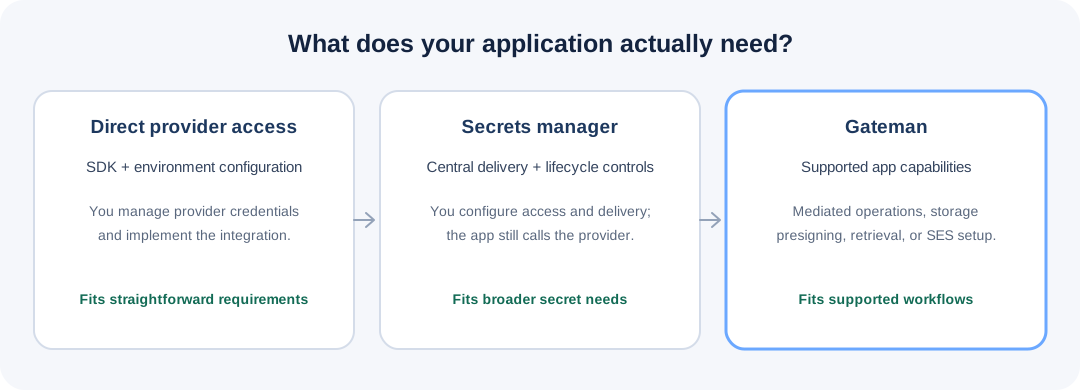
| Approach | Main application responsibility |
|---|---|
| Direct SDK and environment variable | Supply and protect provider credentials; implement and maintain the provider integration |
| Dedicated secrets manager | Configure secret access and delivery; still implement the provider integration when the app calls the provider directly |
| Gateman for supported capabilities | Configure app capabilities and provider settings; integrate the documented Gateman operation, presign, retrieval, or provisioning workflow |
This is an architectural comparison, not a security ranking. Gateman does not eliminate all secret management, and it does not provide every provider operation. It can reduce credential distribution and repeated integration work where a supported capability fits.
Complex systems may need dynamic credentials, federation, fine-grained organization-wide policy, compliance evidence, or lifecycle automation across many kinds of infrastructure. A dedicated secrets platform can be the right engineering choice for those needs. Zero-trust architecture and enterprise-wide controls should be driven by actual identity, access, and operational requirements—not adopted automatically for a small app that needs one provider action.
The practical test is whether the alternative makes the original feature easier to build and maintain. If a security tool adds more setup than the integration it protects, teams may avoid it. A useful design makes the better path straightforward enough to adopt.
Choose what the application actually needs
Use a direct SDK when the provider’s own API and control are important and your credential handling is manageable. Use a secrets manager when you need broad, centralized secret delivery and lifecycle controls. Evaluate Gateman when you want a supported provider operation without placing that provider key in the app, or need its storage presigning, explicit retrieval, or SES provisioning workflow.
The right choice is the smallest architecture that covers the real requirement and remains maintainable as the application grows. For supported integrations, Gateman aims to make credential separation part of a useful development workflow—not a separate security project that must be completed before the feature can ship.
Further reading
- Gateman: email sending · S3 presigning · R2 presigning · stored secrets · database passwords · SES provisioning
- Existing comparisons: Gateman vs 1Password · Gateman vs HashiCorp Vault · Gateman vs Doppler and Infisical
- Official product documentation: Vault secrets engines and leases · Doppler configs · Infisical secrets management · 1Password CLI secret delivery